Report Failed Logins

Contents
Report Failed Logins can be accessed from the File tab→Security→Reports→Report Failed Logins.
Being able to track failed logins in a requirement of the 21 CFR Part 11.
Choosing a Failed Logins Report (Figure 32.25) will allow you to view:
| • | Date and Time of failed login |
| • | Reason for failure |
| • | User Name when failure occurred |
| • | Login Name when failure occurred |
| • | Windows User Name when failure occurred |
| • | Computer name on which failure occurred |
| • | IP Address used to access server at time of failure |
| • | First Name of user associated with failure |
| • | Last Name of user associated with failure |
The report can be arranged, grouped, and filtered according to your needs.
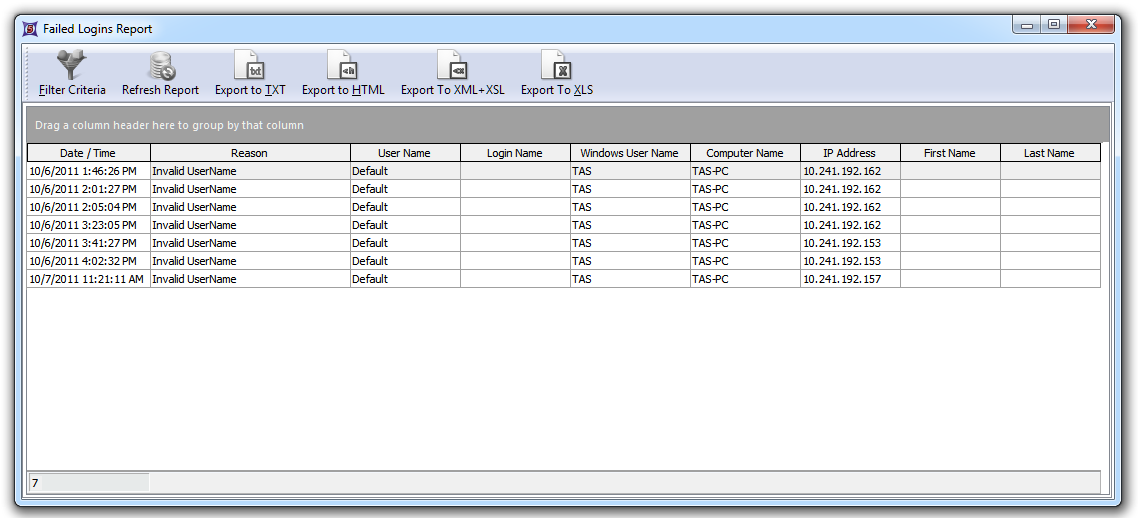
Figure 32.22 The Failed Logins Report Dialog