Opening a Dockable Window

Contents
Dockable windows are opened by clicking on the appropriate Ribbon commands as listed in the table below.
Dockable Window |
Command |
|---|---|
Data List |
Data→Organize Date Sets→Data List or Batch→Organize Date Sets→Data List |
Snapshots |
Tools→Snapshots→Snapshots |
Layout Navigator |
View→Navigators→Layout Navigator |
Data Navigator |
View→Navigators→Data Navigator |
Gate Navigator |
View→Navigators→Gate Navigator |
Compensations Navigator |
Tools→Transformations→Compensations |
Formatting Dialog |
Format→Click any item |
Transformations Navigator |
Tools→Transformations→Transformations |
Batch Actions |
Batch→Batch Processing→Batch Actions |
Standard Operating Procedures |
View→Tools→Standard Operating Procedures |
Permission Rules |
Quality→SOP→Permission Rules |
Custom Tokens |
View→Tokens→Custom Tokens |
When opened, the window will first appear as a floating window, undocked, in the center of the screen (Figure 4.18). You can leave it as a floating window, or proceed to dock it in the location of your choice.
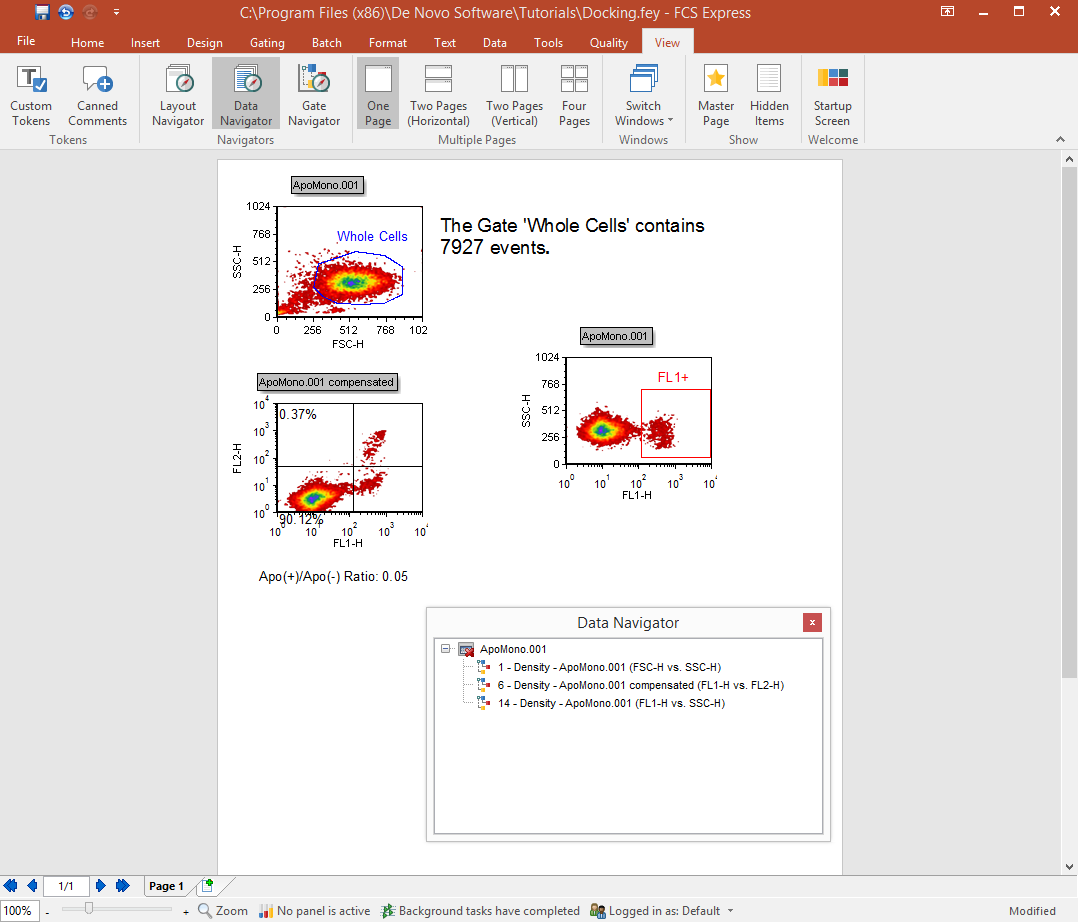
Figure 4.18 Data Navigator, Floating (Undocked)